
The Science behind designing websites for the mass mind
Abstract
Designing a website for a huge amount of public involves many challenges. This article focuses on technical and psychological foundations required to build a high traffic intensive interface.
Abstract
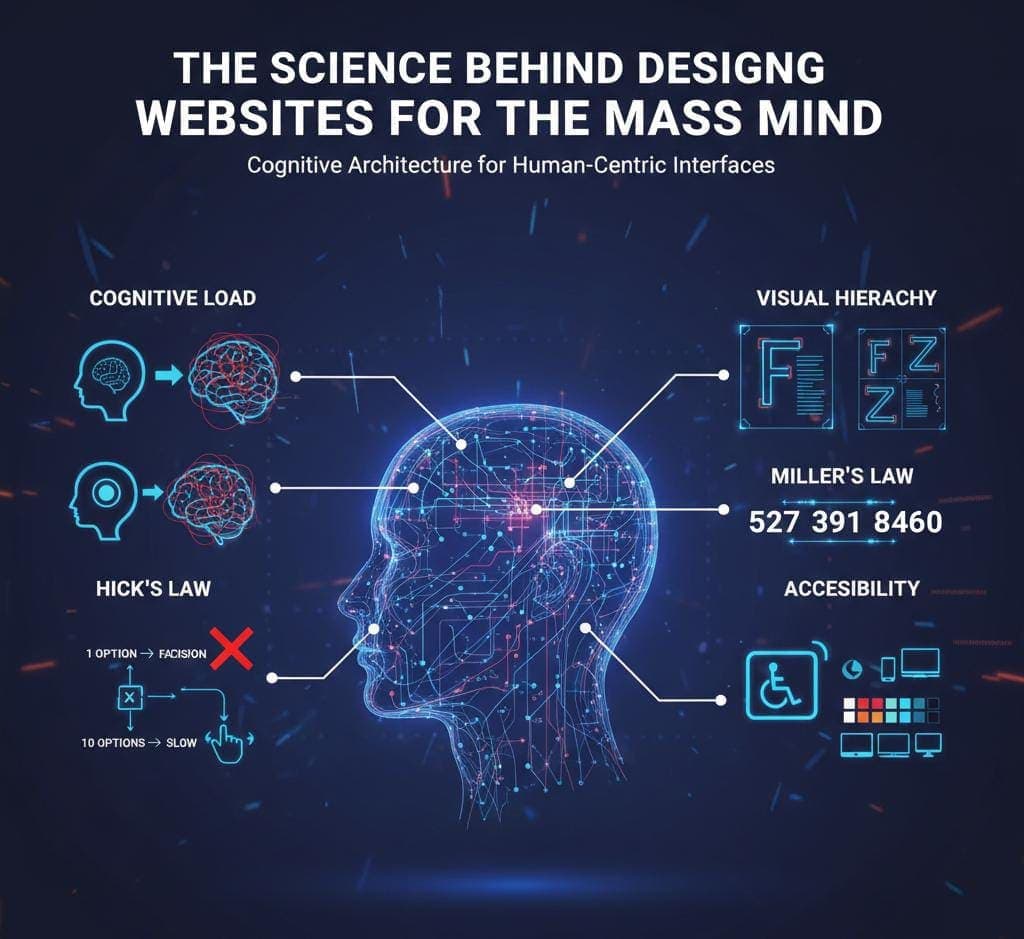
Designing a website for a huge amount of public involves many challenges. When a website is designed for millions of publics, the developer needs to take care of certain things such as technical literacy of users, capability of user’s device and various other problems which the user may face during the website navigation. Imagine a situation where a parent needs to pay their bill online in the app/website in a crowded place while holding their crying baby. It can frustrate the user if the app/website is not cognitively efficient. This article focuses on technical and psychological foundations required to build a high traffic intensive interface. It mainly focuses on the Cognitive Load theory and “Human Computer Interaction” principles such as Miller’s Law, Hick’s Law and Fitts’s Law to create a design which is accessible, intuitive and scalable to elevate the user’s digital experience.
Introduction
When a developer designs for one, he needs to please only one person. When designing for a client, he needs to please the boardroom. But when designing for public – a diverse, unpredictable and massive number of users, the developer needs to please the human brain in general. The developer needs to keep in mind about the different patience level, internet speeds, device capabilities of the large number of users. If the developer needs to please the human brain, he will have to work not just a designer but act as a cognitive architect.
Explanation
Given below are some of the critical concepts and laws that the developer needs to keep in brain while designing –
1. Cognitive Load
It is amount of energy the human brain needs to spend to navigate the user interface. It is like a fuel needed to run a car. Better mileage equals to high user base of that car. So, in this case, developers need to think about how they can reduce the cognitive load to attract huge number of publics. There are two types of cognitive load –
- Intrinsic Load: The minimum effort required to achieve a specific goal. The developer can simplify the load but cannot eliminate it completely.
- Extraneous Load: The amount of mental effort wasted due to poor user interactive design.
Ways to fix this issue –
- Keep the user interface design simple and standard.
- Remove any unwanted element.
- Remove extraneous load completely.
2. Hick’s Law
Hick’s Law states that the more choices a person is presented with, the more time the person takes to make the decision. For a mass, this becomes critical to choose a option, if the developer gives different options at the same time. They simply become overwhelmed when they see many options, often choose nothing and simply leave.
Ways to fix this –
- Give only the essential elements needed.
- Try to reduce the number of options if possible.
- Do not show all options at once. Instead break them into steps.
3. Miller’s Law
Miller’s law states that the working memory of average person can only keep 7 (plus or minus 2) items at a time. In this case, it means that an average human who is not able to keep a long string of numbers in their memory, they break them into small chunks.
Ways to fix this –
- Breaking a series of large numbers into small chunks of digestible groups.
- Place all the elements into groups if possible.
4. Fitts’s Law
Fitts’s law states that the time required to move to a specific goal depends on the distance to it divided by the size of the target. We can use this law in our designs by simply putting essential elements closer to each other. Keep other non-essential elements away from essential ones.
Ways to fix this –
- Keep the essential elements bigger in size, predictable and close to each other. Don’t place the across screens that will fail this law.
- For mobile users, place the essential items near the reach of the thumb finger. Don’t place them away from the reach of finger. A simple example is to place the search button of app drawer below the screen to make it easy for thumb to reach.
5. Visual Hierarchy
When all information is given at once, users often do not read the full. They only scan some portions and may miss the important ones.
- The F pattern: The pages that are heavily loaded with text, the eye scans the top, skips a bit, moves down, again scans a little bit and then moves down following the left side of the page, making a F-pattern.
- The Z pattern: The pages that are heavily loaded with images, the eye scans from the top left to the top right, then moves diagonally to the middle, again scans from left to right and eventually moves at the bottom, making a Z pattern.
Ways to fix this –
- Put the critical value in the top left to right or in dead center.
- Do not place any important value in the bottom right (blind spot) of a page.
- Use heading, bullets and numbers to stop the f pattern.
6. Accessibility
Accessibility is not just a feature; it is the fundamental. Making a website for the mass means it includes various types of personality, various internet speeds and various difficult situations in which the user may need to navigate the website.
Ways to fix –
- Use high contrast texts
- Use elements which anyone can understand at any time.
Conclusion
When designing a website for the mass the developer needs to get rid of his/her own preference and should have an empathy for the users using the website. By reducing cognitive load, the developer is able to reduce the mental energy needed by the user to navigate the website. By following Hick’s law, the developer can speed up users’ decision making; by following Miller’s law, users can retain important information and following the Fitts’s law and accessibility standards, users can easily navigate thought the website. The motive of the developer should be to make the website cognitively efficient rather than making it beautiful, which will ultimately result in their experience elevation and satisfaction of the user.